Explore the product
Desktop POS software with inventory and accounting.
The till, the stock and the books — on your own computer. YourBooks POS is installed on your shop’s computer, with its own database. Every sale posts to real double-entry books, stock stays accurate, and URA EFRIS invoices come straight from the till.
- 30 days
- free to try
- 3 in 1
- till, stock and accounts
- 1 install
- database included
Looking for EFRIS integration for your POS?
YourBooks POS is already integrated with URA EFRIS.
The integration is already built into the till, so there is nothing to develop and no second program to run. Sell as usual, and the fiscal invoice comes out of the same till with its FDN and QR code. EFRIS is a paid service, set up with us.
Fiscal invoices straight from the till
Ring the sale and it goes to URA as you take payment. No second program, and nothing to retype into the URA portal.
FDN and QR code on the receipt
Each fiscalised sale prints with its Fiscal Document Number, verification code and URA’s QR code, on a till slip or an A4 invoice.
Tax invoices or receipts, whichever you issue
VAT-registered businesses issue tax invoices with tax on every item. Businesses not registered for VAT issue EFRIS receipts.
Standard, zero-rated and exempt
Each product carries its tax type, sent to URA with the right code, and it can be changed for a single sale when needed.
Products and stock reported to URA
Register products with URA from the POS, and report stock you buy in and stock you write off.
Credit notes for returns
A refund against a fiscalised sale raises its credit note with URA from the same screen.
A sale is never fiscalised twice
If a reply from URA is lost, sending the sale again returns the same document instead of creating a second one.
Good to know: URA issues every fiscal invoice, so fiscalising needs an internet connection. EFRIS setup covers your URA registration and the credentials your till uses, and is priced separately from the POS licence.
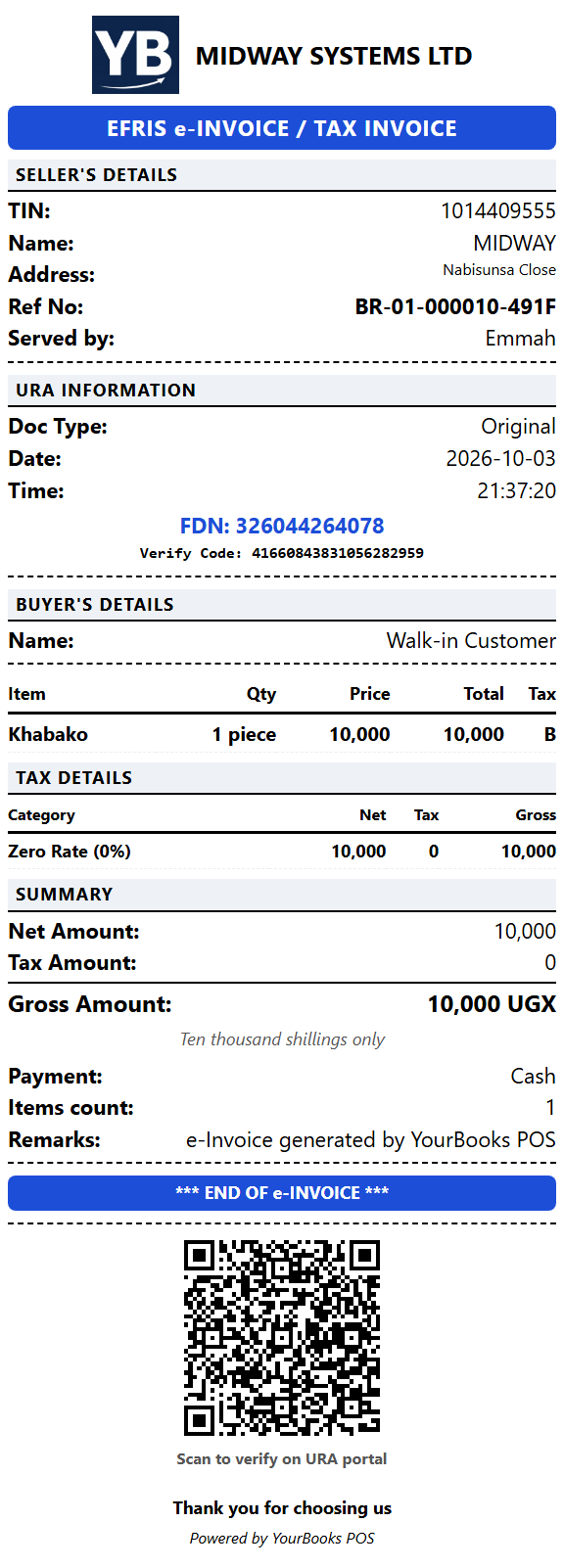
A real receipt from YourBooks POS, accepted by URA through its test environment. Click it to see it full size.
Most POS software is a website
Which is fine until the connection drops mid-queue. YourBooks POS is a program on your own computer — a weak connection slows nothing down, and an outage is an inconvenience, not a closed shop.
Cloud-only POS
- Connection drops — the till stops
- Your data lives on someone else’s server
- Slow on a weak mobile connection
- Stop paying and you lose access to your books
YourBooks POS
- Keeps ringing sales when the connection drops
- Your data sits on your own machine
- Instant — a sale is saved on your computer first
- Your books stay readable even if a licence lapses
Using URA EFRIS? Fiscal invoices are issued by URA, so that part needs the internet. If the connection drops, the sale is still saved on your computer and can be sent to URA once you are back online.
Built for how shops actually run
Everything a counter needs, and the accounting behind it done properly.
Runs on your own computer
Sales, refunds, stock and the day’s close all happen on the shop’s own machine, so a weak or dropped connection does not stop the counter. The internet is needed to activate, for updates, and for URA EFRIS.
Real double-entry accounting
Every sale posts to a proper general ledger, not a sales list you reconcile later. Trial balance, profit and loss, and balance sheet come from the same books.
More than one till
One computer holds the data; other tills connect over the shop’s network. Same stock, same customers, same day’s takings.
Stock that stays honest
Per-branch levels, purchase orders, transfers, adjustments and reorder alerts — with cost tracked per unit, so your margins are real numbers.
URA EFRIS, for Uganda
Businesses in Uganda can fiscalise invoices and credit notes, register products with URA, and report stock movements. URA issues each fiscal invoice, so this part needs the internet. Arranged separately from the POS — ask us for a quote.
Backups that run themselves
Your books are backed up automatically every day on your own machine, with one-click restore — and you can download a copy to keep somewhere else.
Straightforward pricing
Priced per shop, in Uganda shillings. Tills on the same network are included — a shop in another town is a second licence, and we will price it with you.
Monthly
UGX 50,000/ month
- One shop, multiple tills
- Support included while active
- All new versions while active
- Renew monthly — 7 extra days to renew after it ends
Yearly
UGX 500,000/ year
- One shop, multiple tills
- Support included all year
- All new versions while active
- Renew yearly — an extra month to renew after it ends
- Saves UGX 100,000 against paying monthly
One-off — buy it outright
UGX 2,500,000once
- One shop, multiple tills
- Yours permanently — no renewal
- 3 months support
- The version you buy — updates come with a subscription
Pays for itself against the yearly plan in about five years.
URA EFRIS is priced separately. It applies to businesses in Uganda, and covers registering with URA and issuing the credentials your till uses — so the cost depends on your setup. Outside Uganda it does not apply. Ask us for a quote.
Common questions
Does it need the internet to work?
For everyday selling, no. YourBooks POS runs on your computer and stores your data there, so ringing sales, printing receipts, managing stock and closing the day carry on without a connection. You do need the internet to activate your licence, for the occasional licence check and updates, and for URA EFRIS: URA issues every fiscal invoice, so one can only be issued while you are online. If the connection drops, the sale is still saved on your computer and can be sent to URA once you are back online.
What happens to my data if I stop paying?
Nothing is deleted. When a subscription ends you still have time to renew: a week on the monthly plan, a month on the yearly one, and the till keeps selling meanwhile. After that the POS stops recording new sales, but reports and day-close keep working, so you always have access to your own books. Your data stays on your computer and remains yours.
Can I use it on more than one till?
Yes. Install it on each till. One computer holds the data and the others connect to it over your shop’s network, sharing the same stock and sales. Tills on the same network are covered by one licence.
What about a second shop in another town?
A separate premises needs its own installation, because two shops cannot share one computer’s database. One licence can cover more than one site — talk to us and we will price it together. Each shop keeps its own books.
Is it already integrated with URA EFRIS?
Yes. The integration is built into the POS: you fiscalise a sale from the till and the receipt prints with its FDN, verification code and QR code. VAT-registered businesses issue tax invoices and businesses not registered for VAT issue EFRIS receipts. You can also register products with URA, report stock, and raise credit notes for returns. Fiscalising needs an internet connection, because URA issues each invoice.
Is URA EFRIS included in the price?
EFRIS applies to businesses in Uganda and is arranged separately from the POS licence. It covers registering your business with URA and issuing the credentials your till uses, so the cost depends on your setup. Once it is set up, the POS fiscalises invoices and credit notes, registers products and reports stock movements to URA. If you are outside Uganda, none of this applies and the POS works without it.
Can I use it outside Uganda?
Yes. Nothing in the POS is tied to one country — it sells, tracks stock and keeps the books the same way anywhere. EFRIS is the one Uganda-specific part, and it is optional. Listed prices are in Uganda shillings, so talk to us if you are buying from elsewhere.
Do I keep getting new versions?
On a monthly or yearly subscription, yes — while it is active, new versions install themselves and you do not have to do anything. If you bought outright, you keep the version you bought and can use it indefinitely, but it does not receive updates: new versions come with a subscription, and switching to one brings you up to date. If you ever reinstall, use the version you bought; the POS will point you to it.
What computer do I need?
Windows 10 or 11, 64-bit, with about 1 GB of free disk space and 4 GB of memory or more. Everything else is included — you do not need to install a database or any other software.
Can I try it before buying?
Yes. It is free to use for 30 days with no card and no account. Install it, run your shop on it, and decide afterwards.
Talk to a person
A till that stops is an emergency, so getting hold of us should not be hard. Support is built into the app itself — raise a ticket from the counter and the reply comes back in the same window, no email thread to chase.
Before you buy, we are happy to walk through it with you and answer questions about your particular shop.
Email us
support@midwayug.com
Support desk
Raise a ticket and track the reply
Call us
+256706090021
Message us
A Midway product
midwayug.com — also behind YourBooks ERP and the EFRIS Gateway.
Try it in your own shop
Install it, trade on it for 30 days, and see whether it fits how you work. Nothing to pay until you decide.
Download for WindowsNo card, no account. Works on Windows 10 and 11.