
EFRIS-integrated POS software for Uganda
Issue URA EFRIS invoices and credit notes from YourBooks POS, with FDN and QR codes on receipts. Learn about setup, connectivity and separate EFRIS costs.
Looking for EFRIS integration for your POS?
YourBooks POS is already integrated with URA EFRIS.
The integration is already built into the till, so there is nothing to develop and no second program to run. Sell as usual, and the fiscal invoice comes out of the same till with its FDN and QR code. EFRIS is a paid service, set up with us.
Fiscal invoices straight from the till
Ring the sale and it goes to URA as you take payment. No second program, and nothing to retype into the URA portal.
FDN and QR code on the receipt
Each fiscalised sale prints with its Fiscal Document Number, verification code and URA’s QR code, on a till slip or an A4 invoice.
Tax invoices or receipts, whichever you issue
VAT-registered businesses issue tax invoices with tax on every item. Businesses not registered for VAT issue EFRIS receipts.
Standard, zero-rated and exempt
Each product carries its tax type, sent to URA with the right code, and it can be changed for a single sale when needed.
Products and stock reported to URA
Register products with URA from the POS, and report stock you buy in and stock you write off.
Credit notes for returns
A refund against a fiscalised sale raises its credit note with URA from the same screen.
A sale is never fiscalised twice
If a reply from URA is lost, sending the sale again returns the same document instead of creating a second one.
Good to know: URA issues every fiscal invoice, so fiscalising needs an internet connection. EFRIS setup covers your URA registration and the credentials your till uses, and is priced separately from the POS licence.
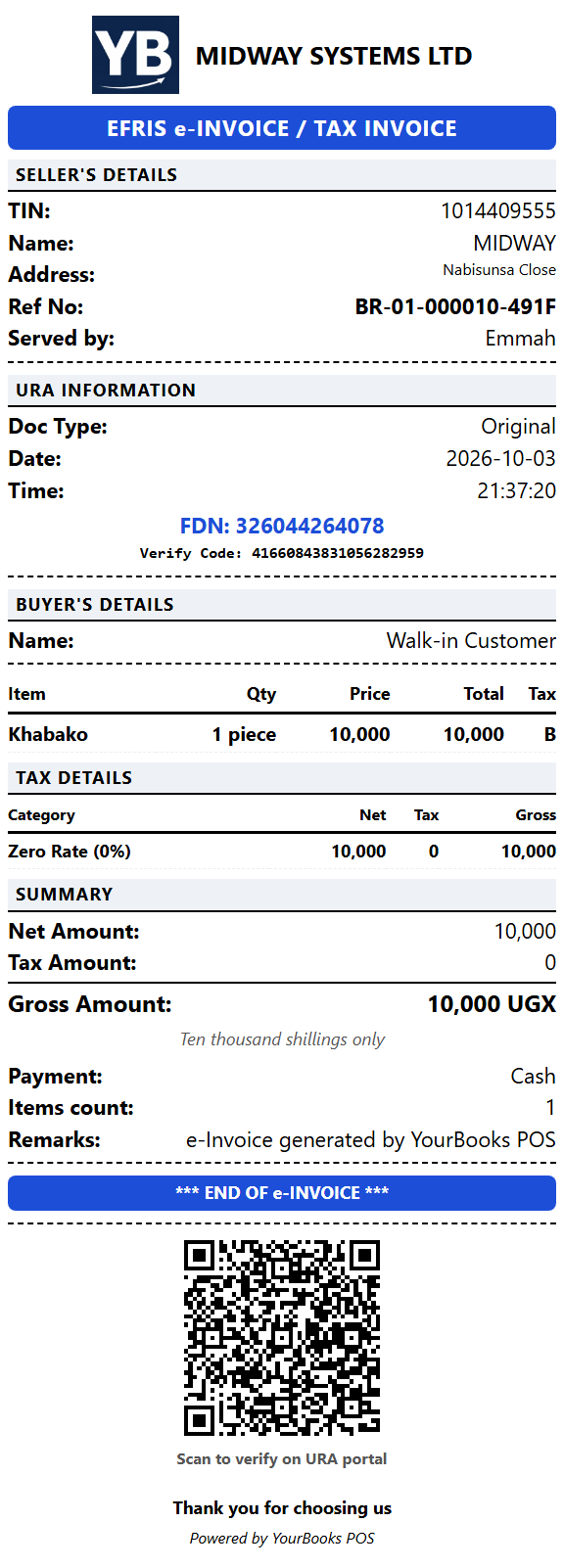
A real receipt from YourBooks POS, accepted by URA through its test environment. Click it to see it full size.
Getting your business ready
Contact Midway before using EFRIS to arrange your business registration and the credentials your till needs. Setup is separate from your POS licence. Once configured, you can register products, report stock movements and fiscalise sales from the POS.
From sale to fiscal receipt
- Record the items and payment in the till.
- Send the invoice to URA through the built-in integration while connected to the internet.
- Print the fiscalised receipt with its FDN, verification code and QR code.
Returns against fiscalised sales can raise credit notes from the POS. The receipt examples above show the thermal and A4 formats.
When your connection drops
Everyday sales remain saved on your shop’s computer. URA must issue each fiscal document, so fiscalising requires internet access. A saved sale can be sent when connectivity returns; recording a sale locally does not itself make it an EFRIS invoice.
Try it in your own shop
Download the Windows app for a 30-day trial, or contact us to discuss your setup.